
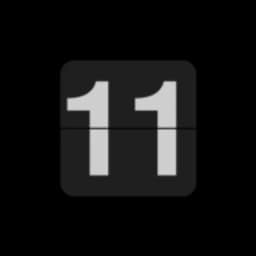
Screenshots
About FlipClock
FlipClock transforms your Android device into an elegant flip clock display. Built with simplicity in mind, it delivers a distraction-free timekeeping experience without unnecessary permissions or intrusive ads.
Switch between 12 and 24-hour formats with a quick double tap. Rotate your device to toggle between landscape and portrait modes, adapting the display to your preference. The clean interface puts the clock front and center, with a satisfying flip animation that transitions from hours to minutes.
This app works especially well on older Android phones with LCD screens, giving them a second life as dedicated desk clocks or bedside displays. If you're using a newer phone with an OLED screen, keep usage sessions moderate to avoid potential screen burn-in over extended periods.
The open-source codebase reflects a commitment to transparency and security. You know exactly what the app does, with no hidden tracking or data collection—just a reliable clock display. Minimal resource consumption means it runs smoothly across a wide range of Android versions, from Android 4.1 and up.
FlipClock suits anyone looking for a no-frills clock app: shift workers needing a bedside timepiece, offices wanting a lobby display, or anyone who appreciates analog-style flip clock nostalgia on their phone. Download FlipClock today and enjoy timekeeping without the clutter.
Pros & Cons
Pros
- No ads or tracking—fully transparent open-source codebase
- Minimal permissions and resource usage across Android versions
- Ideal for repurposing older phones as dedicated desk or bedside clocks
- Simple, distraction-free interface with satisfying flip animations
Cons
- OLED screen burn-in risk with extended use on newer phones
- No customization options beyond 12/24-hour format switching
- Limited functionality—designed as a clock display, not a full alarm app
- Landscape and portrait rotation tied to device orientation, not manual toggle
Frequently asked questions about FlipClock
Is FlipClock safe to download?
A malware scan report for this version of FlipClock is not available on Unstore yet. Only install files from sources you trust and keep your device's security protection turned on.
What are the system requirements for FlipClock?
FlipClock runs on Android. The download size is 3.5 MB.
What is the latest version of FlipClock?
The latest version of FlipClock on Unstore is 1.1.1. It was last updated on August 10, 2026.
Who develops FlipClock?
FlipClock is developed by Alynx Zhou.
Related Apps

HWiNFO
Hardware monitoring for Windows—track CPU temp, GPU load, fan speed, voltage in real time.

TransMac
Read Mac drives and DMG files on Windows. Access APFS/HFS+ storage and create disk images.

Advanced SystemCare Free
System optimization tool: clean, repair, and secure your PC. Remove malware, fix errors, and boost performance.

Display Driver Uninstaller (DDU)
Driver uninstaller for GPU and audio — removes residual files for clean Windows updates

Glary Utilities
PC maintenance and optimization suite — clean, repair, and speed up your Windows computer in one action.

Universal ADB Drivers
ADB drivers for Android: Connect any smartphone to Windows PC without manufacturer software.
Latest Articles

Play a free Color Ball Sort Puzzle-style game in your browser (no download)
Oct 6, 2026

Play a free Beach Buggy Racing-style kart racer in your browser (no download)
Oct 6, 2026

Play a free Alto's Adventure-style game in your browser (no download)
Oct 6, 2026

Free online whiteboard like Jamboard: use Quickboard in your browser, no signup
Oct 6, 2026

Free online running pace calculator: splits, race predictor and daily challenge, no download
Oct 6, 2026